Found $1,840/year in subscriptions I'd forgotten about Thought I spent $300/month on food. My real number was $1,100 Cancelled 4 double-ups. $47/month back immediately Called my insurer after seeing the number. Saved $960 a year Paid for itself about 60 times over in the first month Found $1,840/year in subscriptions I'd forgotten about Thought I spent $300/month on food. My real number was $1,100 Cancelled 4 double-ups. $47/month back immediately Called my insurer after seeing the number. Saved $960 a year Paid for itself about 60 times over in the first month
No login. No data sharing. Yours forever.

You earned it.
Where did it go?

MoneyMappd turns your bank statements into an honest picture of where your money actually goes. Every category, every forgotten subscription, every habit you didn't know you had, without handing your bank login to anyone.

Buy now $29 How it works →
⚙️ Runs in the Claude desktop app. Free Claude account required.Setup guide →

One-time payment·No subscription·No bank login·Yours forever

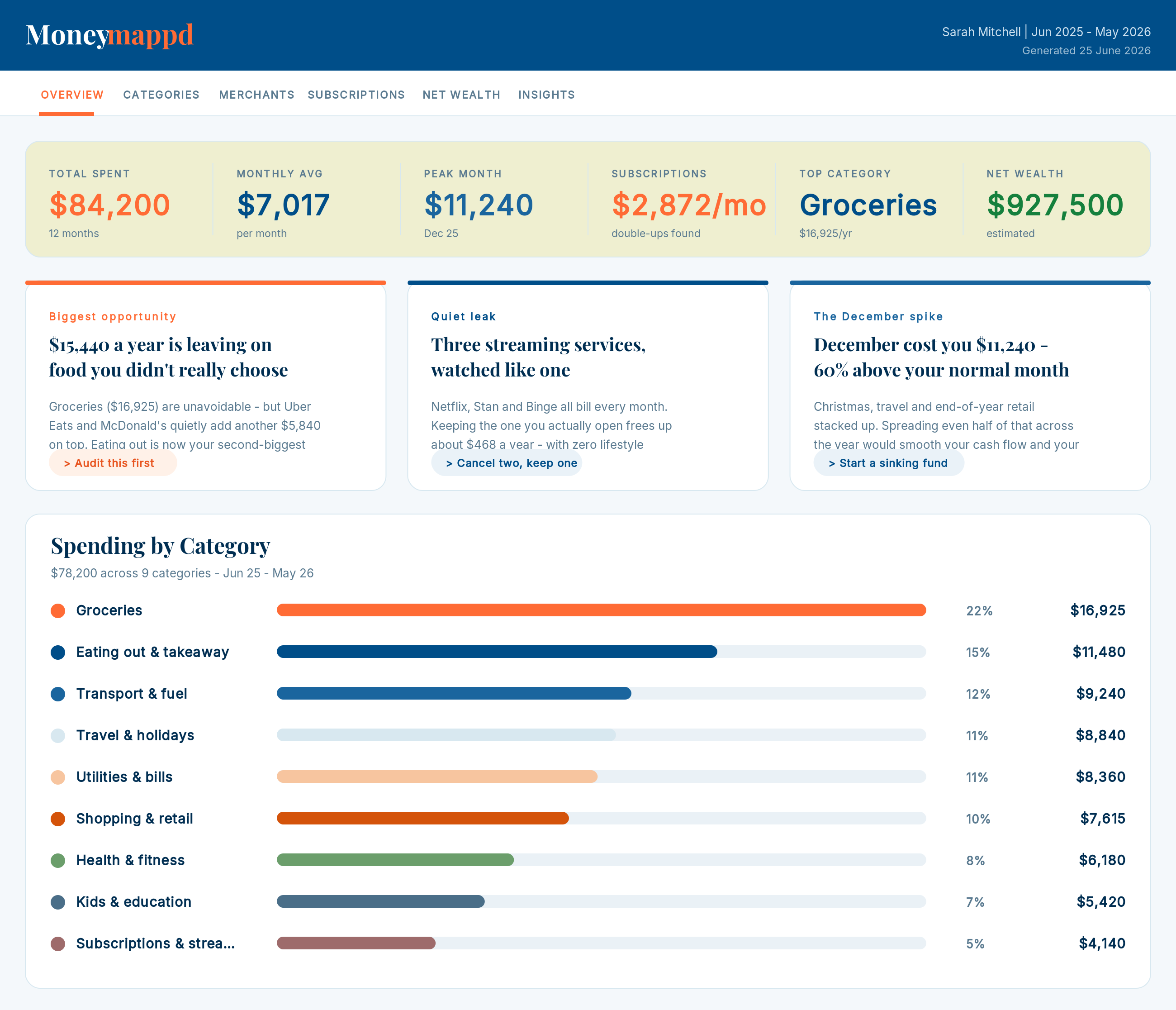
MoneyMappd dashboard showing total spent, monthly average, subscriptions, top category, and spending by category
The real problem

Most of us are guessing about money.

You earn a decent income. You're not reckless. But at the end of every month there's less left than there should be, and you can't quite say where it went.

MoneyMappd doesn't judge that. It just shows you what's actually happening, in plain numbers, so you can do something about it.

How it works

Three steps. Five minutes.

Your statements are read by code inside your own session. Nothing stored, nothing shared. When it's done, you have a file.

01
Export your bank statements
Download a CSV from your internet banking. One file per account. Six to twelve months is ideal. Every Australian bank supports this.

How to export a CSV from any bank:

  • Log into internet banking on a computer (not the app)
  • Open the account you want to export
  • Look for Download, Export, or Download transactions
  • Choose CSV as the format
  • Pick the longest date range available
  • Save the file. Repeat for each account.
02
Open MoneyMappd in Claude
Open the Claude desktop app, start a MoneyMappd task, and drag your CSV files in. Claude reads every transaction with code. Fast and completely private. Nothing leaves your device.
03
Get your dashboard
One HTML file back to you. Open it in any browser, save it, keep it forever. No login required. Works offline. Re-run any time with fresh statements.

New to Claude? Read the full setup guide → It walks you through the whole thing in under three minutes.

What you get

Three things, made clear.

Not a budgeting app. Not a lecture. Just the honest picture your bank never gave you.

01
Spending
Your actual spending
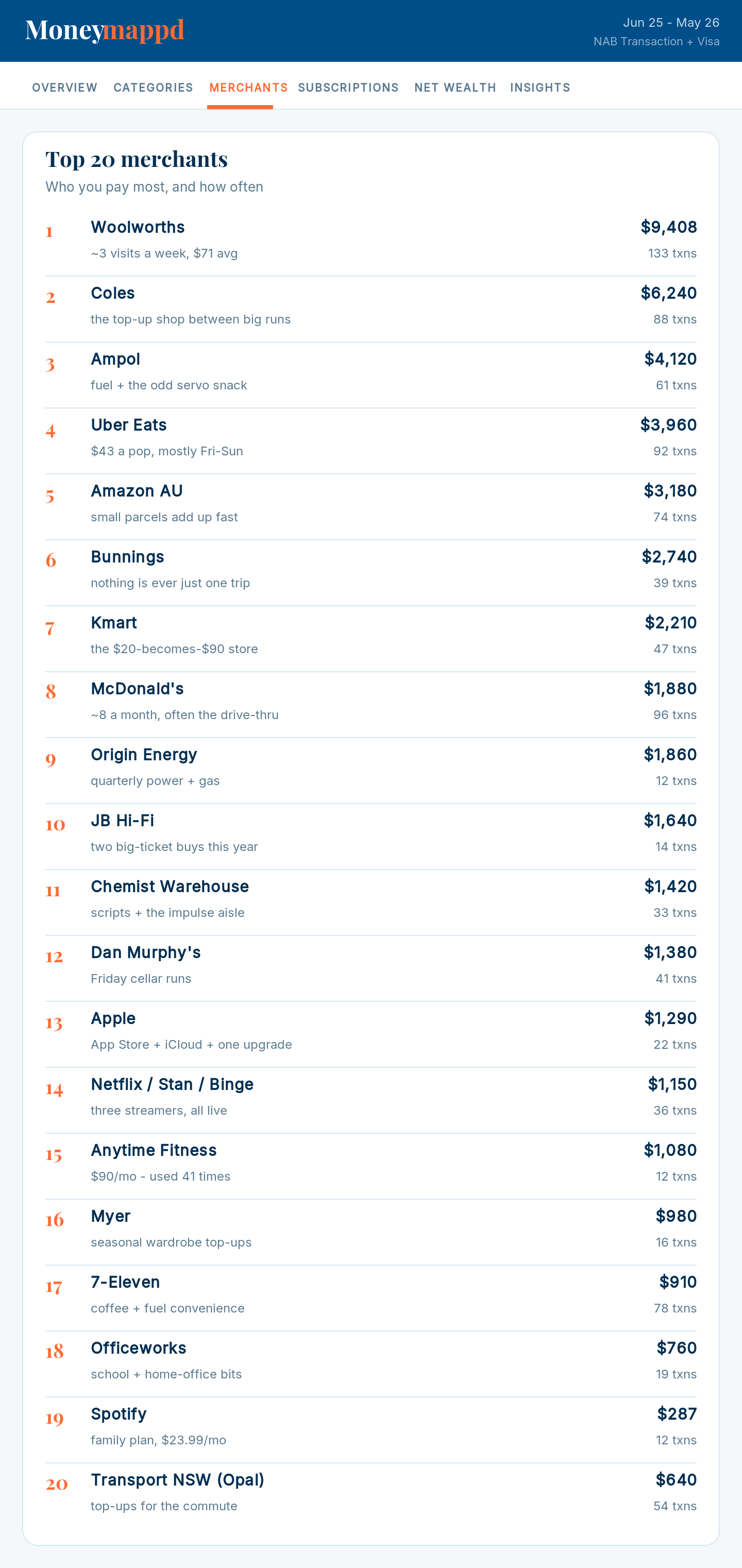
Every dollar sorted into plain categories. Your biggest expenses, top merchants, and the months that quietly blew out. Nothing hidden, nothing rounded.
Monthly trends Category breakdown Top merchants
02
Subscriptions
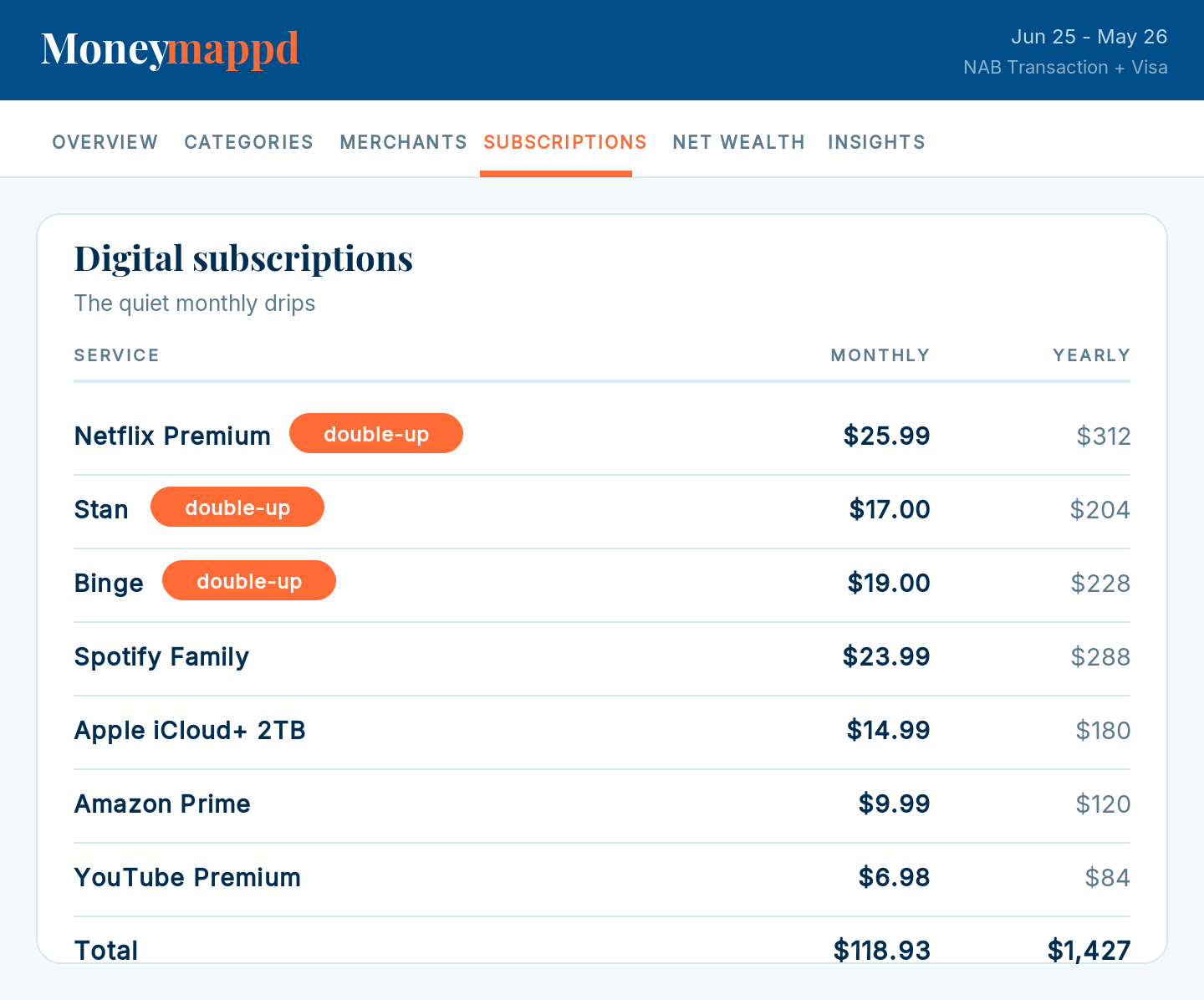
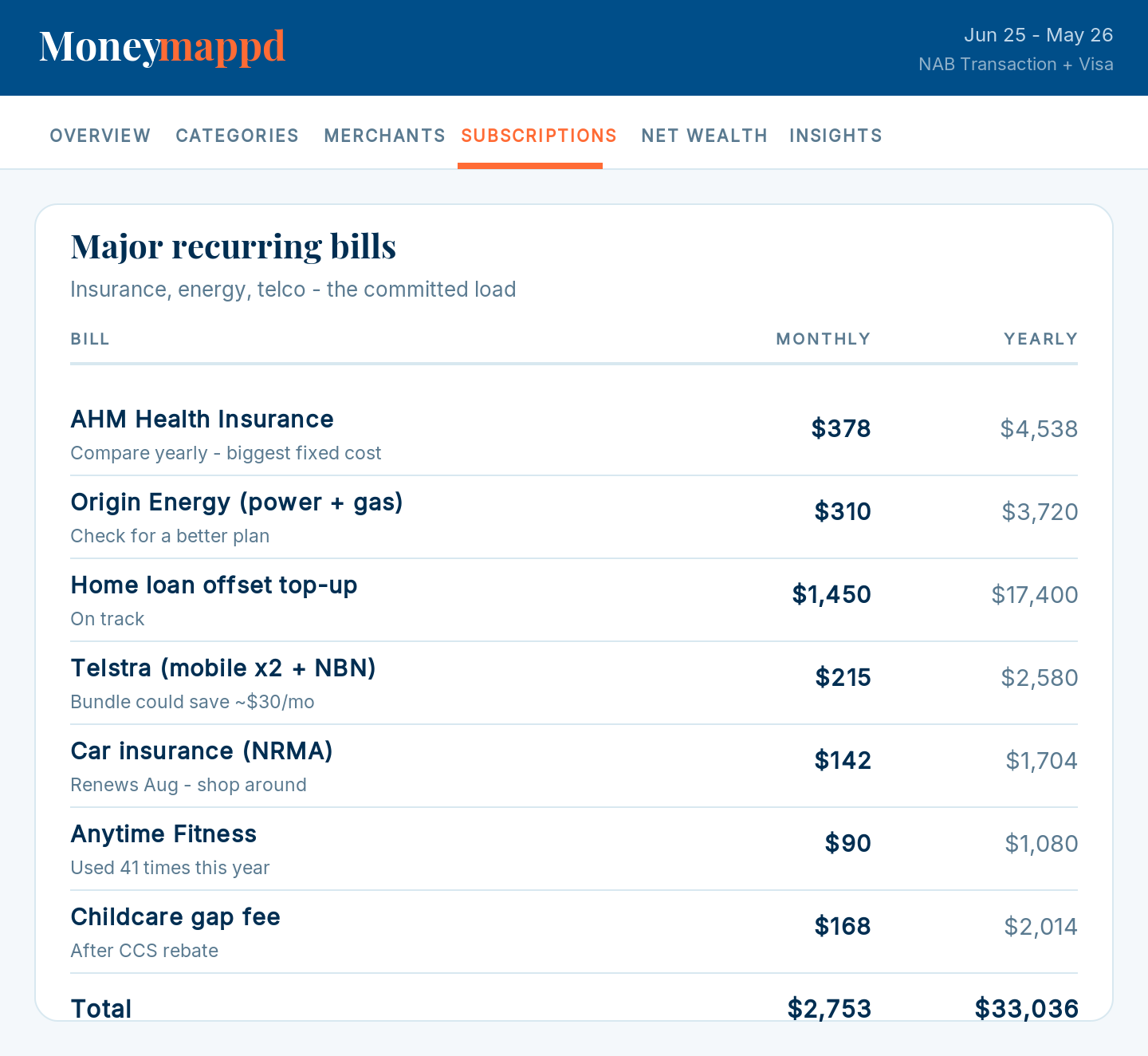
Every subscription
Every recurring charge in one list, including the double-ups you forgot about. Two streaming services doing the same job? You'll see it, and exactly what cancelling saves per year.
Double-up detection Annual cost view
03
Insights
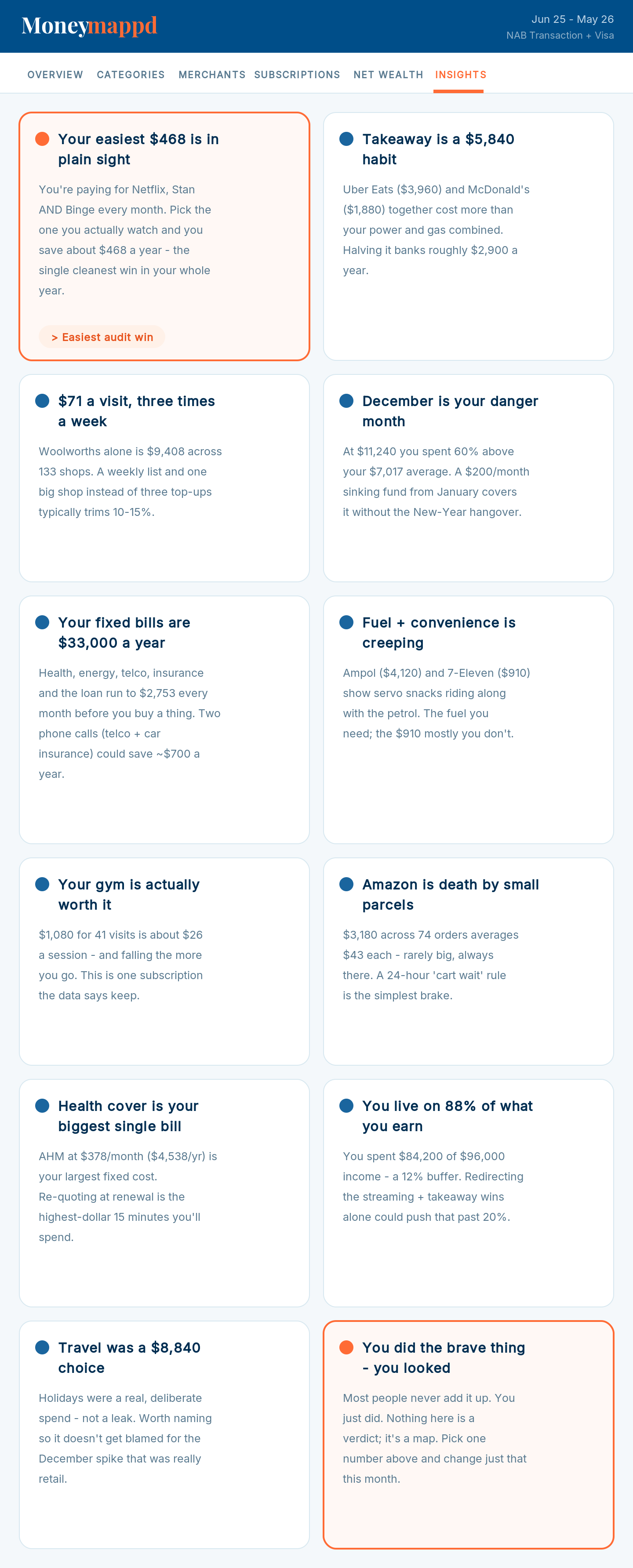
12 personal insights
Specific observations from your own data. Not generic advice. The kind of thing a sharp friend would point out after actually looking at your statements.
Spending shifts Unusual charges Savings opportunities
Buy now $29

One-time payment · Yours forever

Real insights from real data

The things you didn't know you needed to know

These are pulled from a real MoneyMappd dashboard. Your numbers will be different. The aha moments won't be.

📺 Subscription double-up
Three streaming services, mostly watching one
Netflix, Stan and Binge together cost $58/month. Keep one, save around $408 a year.
→ Easy $408/year
🛒 Shopping habit
Woolworths 133 times. 3 visits a week
Frequent top-up shops at $70 average rather than planned weekly shops. One habit that adds up.
→ Worth a look
What people are finding

$29 in. Hundreds back.

Most people find it pays for itself within a week.

★★★★★
"I knew I was spending too much on food but thought maybe $200/month. My actual number was $450. I nearly fell off my chair."
Gai Farley, Melbourne
Immediate behaviour change
★★★★★
"Found two gym memberships overlapping by four months. I'd been paying for one I'd already cancelled. $240 straight back from that alone."
Ben Cryan, Sydney
$240 recovered
★★★★★
"The subscription double-up feature is worth it on its own. Had Netflix and Stan running simultaneously when I thought one was cancelled. All sorted now with $150/year saved."
Elle, Geelong
$150/year saved
Buy now $29

One-time payment · No subscription · No bank login

Private by design

No bank login. No middleman. No data trail.

Other money apps ask for your bank password and pipe your transactions through their servers. MoneyMappd doesn't. You export your own CSV and run it inside your own Claude session. There are no MoneyMappd servers receiving anything, because there aren't any.

When your Claude session ends, only your dashboard file remains, on your device.

🔒No bank login
📁No data stored
🌐Works offline
💻Runs on your device
♾️Keep it forever
🔄Re-run any time
Buy now $29

One-time payment · Requires Claude desktop app (free)

Pricing

One price. Everything included.

No subscription. No upsell. No login. Buy once and it's yours.

$29
AUD · one-time payment · yours forever
Buy now $29
Works inside Claude. Desktop app required. MoneyMappd is a Claude skill. You'll need a free claude.ai account and the Claude desktop app for Mac or Windows (the web and mobile apps won't run it). Setup guide →
New to Claude? Read the setup guide first. It walks through the whole thing in about three minutes.
Questions

Things people ask before buying

Do I need to pay for Claude?
No. The free plan at claude.ai works fine for MoneyMappd. You do need the Claude desktop app installed. The web version and phone app won't work. The setup guide walks you through it.
How do I export a CSV from my bank?
Log into internet banking on a computer, open the account you want, look for Download, Export, or Download transactions, choose CSV, and pick the longest date range. Every major Australian bank supports this. The setup guide has screenshots for the most common banks.
Is my bank data safe?
Your statements are read by code inside your own Claude session. Nothing is sent to MoneyMappd's servers, because there aren't any. When the session ends, only your dashboard file remains, on your device.
Which banks work with this?
Any bank that can export a CSV, which is almost all of them globally. Mix and match banks in the same upload. PDF statements work too. CSV gives the cleanest results.
Can I add multiple accounts?
Yes, and you should. The more accounts you add, the truer the picture. MoneyMappd automatically filters out transfers between your own accounts so nothing gets double-counted.
Can I re-run it later?
Any time. Export fresh statements and run again. You've already paid, so there's no cost to re-run. Most people do it quarterly.

Stop wondering.
Find out.

Five minutes from now, you'll know exactly where your money is going.

Buy now $29

Requires the Claude desktop app (free) · Setup guide